Tips
What Are Music Stems? Stems vs Multitracks Explained
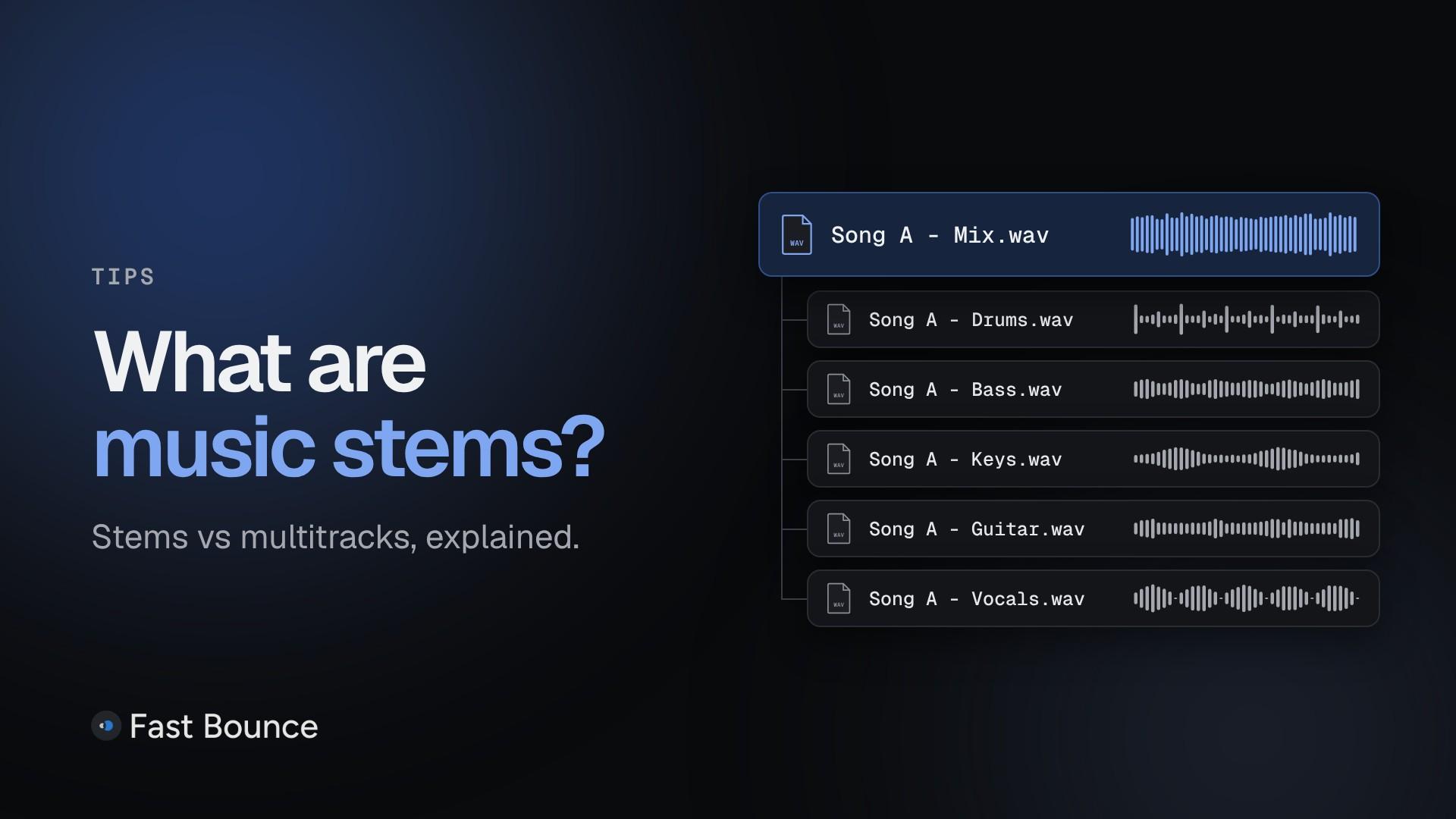
"Can you send the stems?" is a common request at the end of a music project. It's also easy to misread, because people use "stems" for different things. A mastering engineer, a music editor and a remixer can each expect something else.
This guide covers what stems are, how they differ from multitracks and track-outs, what they're used for, and what makes a stem set usable.
What are music stems?
A music stem is one audio file holding one element, or a group of related elements, of a finished mix: all the drums, all the guitars, all the vocals. The Recording Academy's Producers & Engineers Wing describes them this way in its 2025 Delivery Recommendations.
The key word is mixed. As iZotope puts it, what matters most about a stem is that its related tracks are mixed before they're bounced together.
For example, a song mixed from 40 tracks might be delivered as 7 stems:
drums
bass
keys and synths
guitars
lead vocals
backing vocals
effects
Each stem keeps the processing it has in the mix. Played together, the stems should come as close as possible to the finished song.
There's no fixed number of stems. The P&E Wing publishes a default stem set for when the client doesn't name one, but the groups usually depend on the song and on who receives them.
Stems vs multitracks vs track-outs
The difference is grouping and processing. Stems are grouped and mixed. Multitracks are the session's individual, raw tracks. Track-outs are individual tracks bounced one per file.
Term | What it holds | Typical use |
|---|---|---|
Stems | Groups of related tracks, mixed as in the song | Mastering, live shows, edits, remixes |
Multitracks | Every track in the session, raw | Mixing, remixing, archiving |
Track-outs | One file per track, processed or not | Moving to another studio |
Multitracks are what you mix from. Track-outs keep every track's detail and independence, which is why they're common when a project moves to another engineer or studio.
These terms aren't used consistently, and engineers still disagree about what counts as a stem. Some people say "stems" and mean multitracks. If a request is unclear, ask: "Grouped, processed stems, or every track on its own?"
A fourth delivery often comes with stems: mix versions, also called alternate mixes. Think of an instrumental, an a cappella or a TV mix (the full mix without the lead vocal, with the backing vocals). These are usually delivered as complete mixes. The P&E Wing counts the instrumental and no-lead-vocal mixes as stems, but lists them with the mix versions.
What are stems used for?
Stems let someone adjust, rebalance or reuse parts of a finished mix without the original session.
Stem mastering
Some mastering engineers ask for stems with, or instead of, the stereo mix. They can then make small balance changes while mastering, such as lifting the vocal slightly.
Live shows
Artists often play along to recorded parts on stage. Stems let the live team control each part, for example dropping the backing vocals when the band sings them.
Film, TV and advertising
Music editors use stems to shorten a song, drop the vocal under dialogue or build to a moment. Music supervisors often ask for them when they license a song.
Remixes
A remixer usually starts from stems or multitracks rather than the stereo mix.
Immersive mixes
Stems can give an engineer a starting point for an immersive version of a song, such as Dolby Atmos. In January 2023, Apple said more than 80 percent of Apple Music subscribers worldwide were enjoying Spatial Audio. A year later, Music Business Worldwide reported that Apple Music would pay up to 10% higher royalties for music available in Spatial Audio.
Archiving
A stem set is a practical backup of a finished mix. Any DAW can open the files years later, even when the original plugins are gone.
What makes a good stem set?
A usable set lines up exactly and, played together, comes as close as possible to the approved mix. Four of the P&E Wing's recommendations matter most:
One start and end point. Every stem of a song shares the same start and end, so the files line up the moment they're imported.
They add up to the mix, as closely as possible.
Each stem with its effects. Bounce a stem with everything muted except that stem and its effect returns. If several stems share a reverb or delay, agree on how to handle it, for example with a separate effects stem.
Consistent names. Song number, artist, title, mixer, revision, stem name, sample rate and bit depth:
01_ArtistInitials_SongTitle_MixerInitialsMixRevision_StemName_sampleratebitdepth.wav.
Two more points complete the list. Leave room at the end for reverb and delay tails. Deliver every stem in the same file type, sample rate and bit depth.
Should stems include master-bus processing?
It depends on what the receiver needs, so agree on it before you bounce. Many mixes go through compression or limiting on the master bus. That processing reacts to the whole mix: the full mix drives a bus compressor harder than any single stem does. So stems without it, or pushed through it one at a time, won't behave like the full mix.
The P&E Wing's solution keys the stereo-bus compressor from the full mix. Bounce the final mix with the master-bus plugins off; the P&E Wing calls this the "Key Mix". Feed the Key Mix only to the compressor's sidechain, then bounce each stem through the full stereo-bus chain. The compressor keeps reacting to the whole song while one stem plays.
Even then, some master-bus processing can't be recreated in stems. That's why the goal is "as close as possible" to the mix, not an exact match.
Bounced stems vs AI-separated stems
Bounced stems come from the original mix session. AI-separated stems are estimated by software from a finished stereo mix.
The difference is the source. Bounced stems come straight from the engineer's session, each element on its own. Separated stems are an estimate made from the mix. When the session exists, bounced stems are the standard delivery.
How to bounce stems
In Pro Tools, stems come from Bounce Mix (one stem per pass, or several at once with multiple Mix Sources on Studio and Ultimate), from Track Bounce, or from recording each stem's bus to a new track. Our guide on how to export stems in Pro Tools compares the four methods, and our Bounce Mix guide covers every setting.
For many songs, the repetitive part can be automated. Fast Bounce is a bounce automation app for Pro Tools, on macOS and Windows. Select a stem's tracks and Solo adds one bounce with them soloed together. Batch adds one Solo bounce per track, picked by hand or by rule. On a paid plan, load every session, press Bounce…, and Fast Bounce switches between them in Pro Tools while you use other apps. When it's done, the Bounce Summary lists every file made. See what Fast Bounce does.
Stems at a glance
A stem is one element or a group of related elements, mixed and bounced as one file.
Multitracks are the raw individual tracks. Track-outs are individual tracks, one per file.
Good stems share one start and end point, keep their tails, and add up as closely as possible to the approved mix.
Agree on master-bus processing before you bounce.
When in doubt, ask what the person requesting stems expects.